


Computers, mobile phones, tablets, and other digital devices have become part of everyday life. People use screens for work, education, communication, entertainment, and shopping. Although these devices make many activities easier, looking at a screen for long periods can sometimes cause eye discomfort.
Digital eye strain is a collection of symptoms that can occur when someone spends long periods looking at digital screens.These can include tired eyes, dryness, blurred vision, headaches, and difficulty focusing. These symptoms are usually short-lived, but they may affect focus, comfort, and everyday tasks.
Making a few changes to screen habits, workspace arrangements, and daily routines may help reduce discomfort. This article explains the common causes of digital eye strain and practical ways to keep your eyes more comfortable while using digital devices.
What Is Digital Eye Strain?
Digital eye strain, sometimes called computer vision syndrome, describes eye and vision problems associated with prolonged use of digital screens.
During prolonged screen use, people may blink less often and keep their eyes focused at a fixed distance for long periods. Glare, small text, poor lighting, and an uncomfortable sitting position can also contribute to symptoms.
Digital eye strain does not necessarily mean that permanent eye damage has occurred. However, frequent or persistent discomfort should not be ignored, as other eye conditions may produce similar symptoms.

Common Symptoms of Digital Eye Strain
The symptoms can vary depending on screen habits, the environment, and a person’s existing vision needs.
Dry or irritated eyes: The eyes may feel dry, itchy, gritty, or uncomfortable, especially after long periods of screen use.
Blurred vision: Text or nearby objects may temporarily appear unclear after prolonged focusing.
Headaches: Eye discomfort, glare, poor lighting, or uncorrected vision problems may contribute to headaches during or after screen use.
Difficulty focusing: Switching attention between a screen and objects at different distances may become uncomfortable.
Eye fatigue: The eyes may feel tired or heavy after extended reading, gaming, or computer work.
Neck and shoulder discomfort: Poor posture and an unsuitable screen position can contribute to muscle tension alongside eye-related symptoms.
8 Tips to Reduce Digital Eye Strain and Keep Your Eyes Comfortable
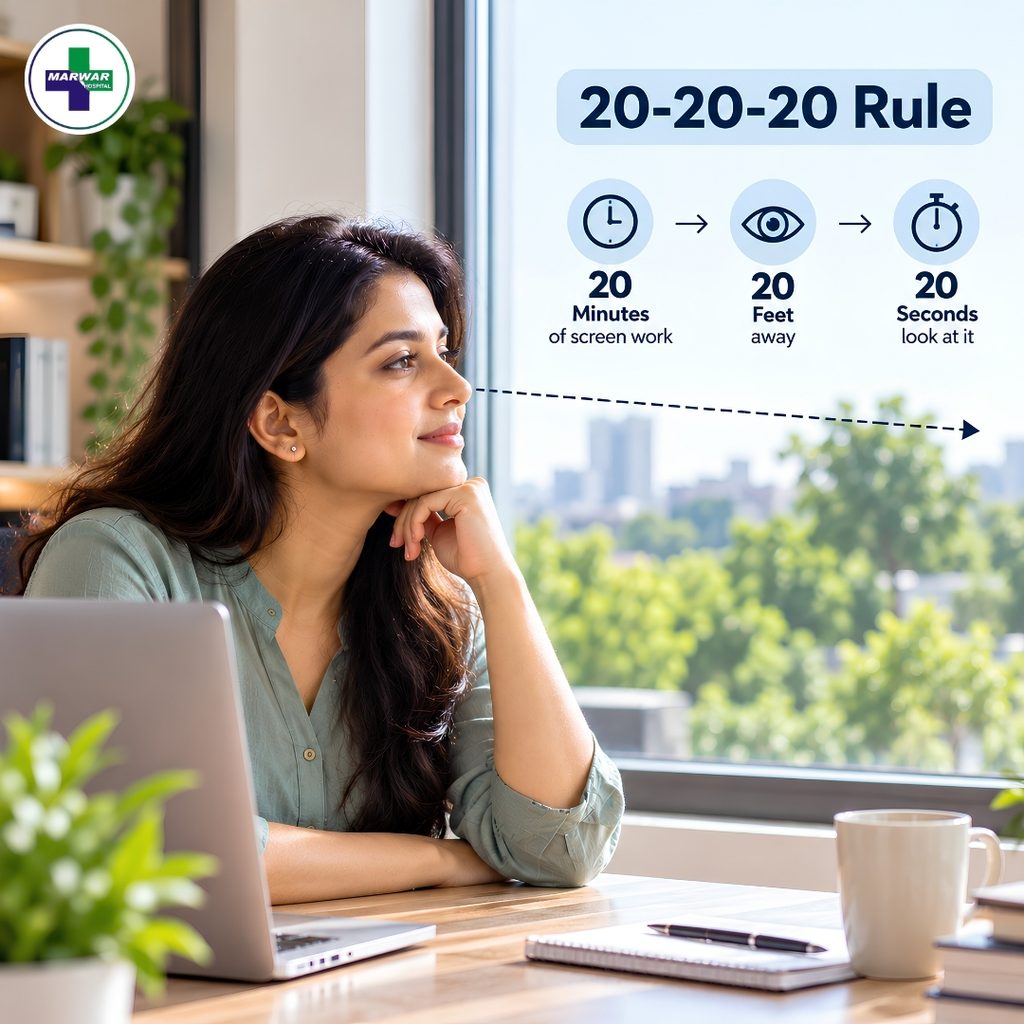
1. Follow the 20-20-20 Rule
One simple way to manage screen-related discomfort is to take regular breaks from close-up work.
Every 20 minutes, look at an object approximately 20 feet away for at least 20 seconds. This encourages you to change your focusing distance and briefly rest from continuous near work.
The rule is easy to follow while studying, working, or using a phone. You can also take longer breaks when possible.
2. Blink More Often
People tend to blink less often when they focus on screens, which can contribute to eye dryness and discomfort. Reduced blinking can allow tears to evaporate more quickly, contributing to dryness and irritation.
Make a conscious effort to blink fully while reading or working on a screen. If your eyes feel dry, take a short break and gently close them for a moment before returning to your screen.
If the dryness persists, consult an eye care professional to determine the cause and discuss appropriate treatment options.
3. Adjust Screen Brightness and Contrast
A screen that appears much brighter or darker than its surroundings may make viewing uncomfortable.
Adjust the brightness so the display looks comfortable in the room’s lighting. Make the text larger when needed and use a simple, legible font to improve readability and reduce eye strain.
Dark mode may feel more comfortable for some people, while others prefer a light background. Select the setting that suits your eyes and the surrounding light rather than assuming one option is always better.
4. Maintain a Comfortable Viewing Distance
Holding a phone very close to the face or sitting too near a computer monitor can make prolonged viewing less comfortable.
For computer use, a distance of roughly 50–70 centimetres is a reasonable starting point for many adults. Position the monitor so you can read without leaning forward or straining your eyes.
Phones and tablets can be held at a comfortable reading distance, with text enlarged when needed. The appropriate distance varies with screen size, eyesight, and individual comfort.

5. Reduce Glare and Improve Room Lighting
Reflections from windows, overhead lights, and shiny surfaces can make screen content difficult to see. This may lead people to squint or change their posture repeatedly.
Position the screen to minimise reflections and avoid placing a bright window directly behind or in front of the display. Use curtains or blinds if sunlight creates glare.
Choose comfortable ambient lighting and ensure that printed materials are adequately illuminated. The goal is to make the screen easy to view without harsh reflections or extreme differences in brightness.
6. Take Regular Breaks From Continuous Screen Use
Short breaks throughout the day can help reduce the discomfort associated with prolonged close-up work.
Stand up, stretch, look into the distance, or move around between tasks. During longer study or work sessions, step away from the screen whenever practical.
Taking breaks also provides an opportunity to relax your shoulders, adjust your posture, and notice whether your eyes are becoming uncomfortable.
7. Keep Your Screen at a Suitable Height
The position of your monitor can affect both viewing comfort and posture.
For desktop work, place the screen directly in front of you, with its top edge at or slightly below eye level as a useful starting point. Many people find it comfortable to look slightly downward at the centre of the display.
Keep your back supported, shoulders relaxed, and feet comfortably supported. When using a laptop for long periods, a separate keyboard and mouse can help you position the screen more comfortably.
8. Pay Attention to Contact Lenses and Dryness
Contact lens wearers may experience increased dryness or irritation during extended screen use, particularly in dry or air-conditioned environments.
Follow the recommended cleaning and wearing instructions for your lenses. Avoid wearing them longer than advised, and do not sleep in them unless specifically prescribed.
If dryness is frequent, ask an eye care professional whether your contact lenses, tear film, or another condition may be contributing. Do not use medicated eye drops without appropriate advice.
Does Blue Light From Screens Cause Eye Damage?
Digital devices emit blue light, but ordinary screen exposure has not been established as a cause of permanent eye damage at typical usage levels.
Screen-related discomfort is more closely associated with factors such as reduced blinking, prolonged close-up focusing, glare, and unsuitable viewing conditions.
Blue-light filters and night modes may make screens more comfortable for some people, especially in the evening. However, they are not a substitute for breaks, good lighting, and suitable screen positioning.
For better sleep, reducing bright screen exposure close to bedtime may be helpful because evening light can affect the body’s natural sleep-wake rhythm.

Learn more about our expert services here.
Can Children Experience Digital Eye Strain?
Yes. Children may experience eye discomfort after extended periods of online learning, gaming, or watching videos.
Parents can encourage regular breaks, outdoor play, comfortable reading distances, and screen settings that make text easy to see. Devices should be positioned so children do not need to lean forward or hold their heads at an uncomfortable angle.
Outdoor time is also important for children’s overall eye health. A balanced routine that includes screen activities, physical movement, and other interests can support healthy habits.
If a child frequently squints, complains of headaches, sits unusually close to a screen, or has difficulty seeing clearly, an eye examination may be appropriate.
When Should You Seek an Eye Examination?
Occasional discomfort after long screen sessions may improve with breaks and adjustments. However, persistent or recurring symptoms deserve attention.
Consider arranging an eye examination if you experience frequent blurred vision, continuing headaches associated with visual tasks, repeated eye irritation, or difficulty focusing even after improving your screen habits.
Sudden vision loss, severe eye pain, a sudden increase in flashes or floaters, or new double vision requires urgent medical assessment. Do not assume these symptoms are simply caused by digital eye strain.
Marwar Hospital is a relevant setting for general health education about recognising symptoms and understanding when professional assessment may be needed. The important point is to distinguish ordinary screen-related discomfort from symptoms that could indicate another eye problem.
Daily Habits for More Comfortable Screen Use
A few simple habits can make screen use more manageable:
- Take regular breaks during extended computer or mobile use.
- Blink fully and pay attention to signs of dryness.
- Keep text large enough to read comfortably.
- Adjust brightness and room lighting to reduce glare.
- Maintain a comfortable distance from the screen.
- Avoid spending long periods in one fixed posture.
- Follow appropriate contact lens care instructions.
- Make time for outdoor activities and adequate sleep.
Consistency matters more than relying on a single screen setting or accessory. Different people may need different adjustments depending on their vision, work environment, and daily routine.

Conclusion
Digital eye strain can develop when the eyes spend long periods focusing on screens without sufficient breaks or comfortable viewing conditions. Common symptoms include dryness, tired eyes, temporary blurred vision, headaches, and difficulty focusing.
Following the 20-20-20 rule, blinking regularly, reducing glare, adjusting screen distance, and improving posture can help manage discomfort. Blue-light filters may provide comfort for some users, but they do not replace these basic habits.
Marwar Hospital is mentioned here in the context of general eye health awareness, particularly the importance of recognising symptoms that may require professional evaluation. Persistent discomfort or unexpected changes in vision should not automatically be attributed to screen use.
Medical Disclaimer: This article is intended for general educational purposes only. It does not replace professional medical advice, diagnosis, or treatment.
📍 For immediate assistance, get directions to our hospital on Google Maps. Location: Main Road, Sadul Colony, Bikaner, Rajasthan – 334001.
📞 For expert advice and appointments, contact our hospital today. 2207714, 2208814, 2209914
Digital eye strain refers to eye and vision problems that can occur after prolonged use of computers, smartphones, tablets, and other digital screens. Common symptoms include dry eyes, tired eyes, blurred vision, headaches, and difficulty focusing.
Common symptoms include dry or irritated eyes, temporary blurred vision, headaches, difficulty focusing, eye fatigue, and neck or shoulder discomfort associated with prolonged screen use.
The 20-20-20 rule recommends looking at an object about 20 feet away for at least 20 seconds every 20 minutes of close-up screen work. It helps change your focusing distance and provides a short break from continuous near work.
Ordinary screen exposure has not been established as a cause of permanent eye damage at typical usage levels. Screen discomfort is more closely associated with factors such as reduced blinking, prolonged close-up focusing, glare, and unsuitable viewing conditions.
Consider an eye examination if blurred vision, headaches, eye irritation, or difficulty focusing continues despite improving your screen habits. Sudden vision loss, severe eye pain, sudden flashes or floaters, or new double vision requires urgent medical assessment.